· Developer Productivity · 9 min read
Why Conversational Interfaces Are the Future of Developer Tools
The era of complex UIs and steep learning curves is ending. Discover how conversational interfaces are transforming developer productivity by letting you describe what you want instead of learning how to use yet another tool.
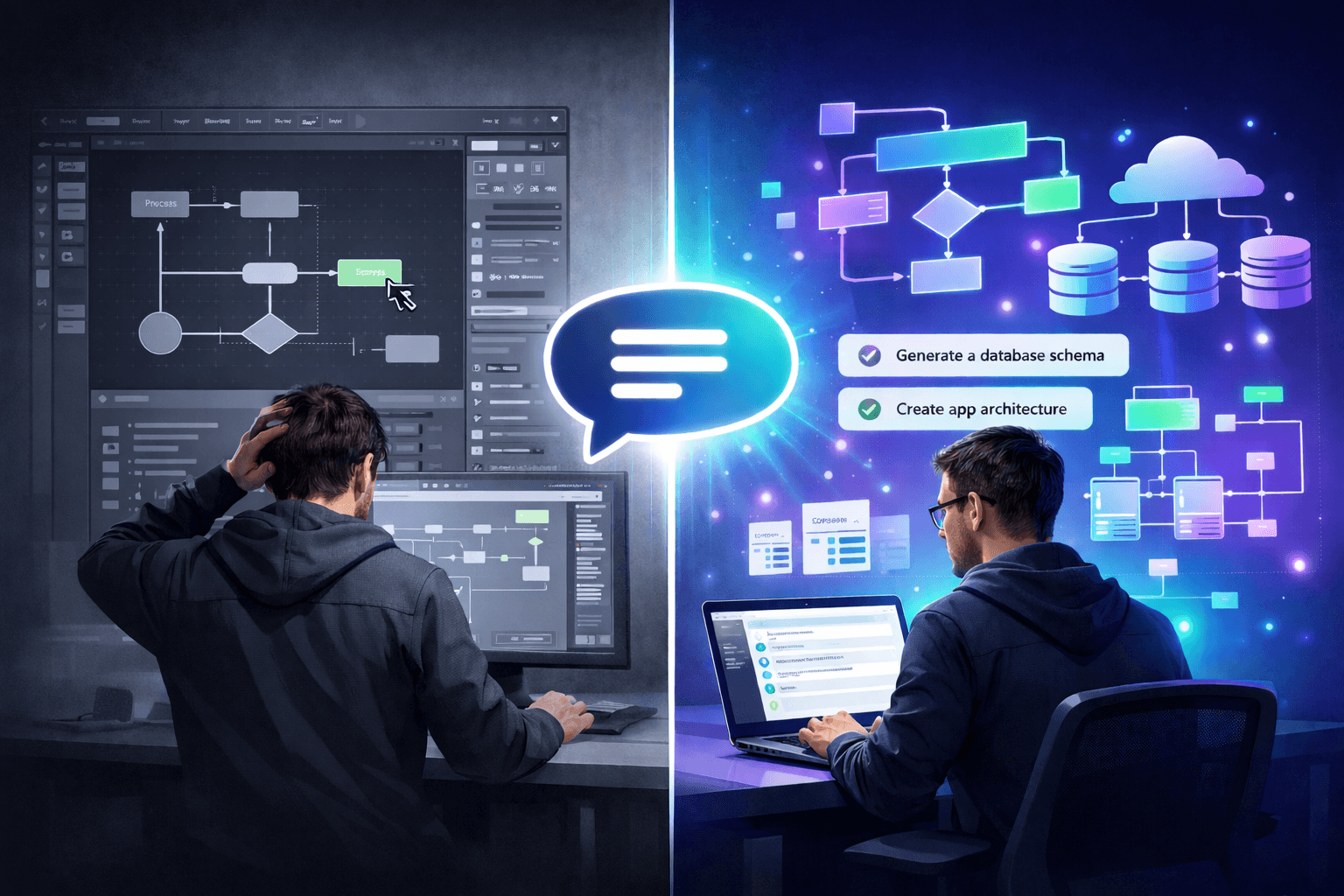
You download a new tool that promises to solve a real problem. You’re excited because this is going to save hours. Then you open it. A wall of buttons, nested menus, and icons you don’t recognize. Somewhere in a submenu labeled “Advanced Settings” is the one thing you actually need. An hour later, you’re still learning the tool instead of using it.
This isn’t any one tool’s fault. It’s how we’ve been building software for decades. We chase power and features, and usability suffers for it. But what if the tool learned your language instead of forcing you to learn its interface?
That shift is happening now, and it’s changing how developers work.
The Cognitive Load Problem in Developer Tooling
Software development is already one of the most cognitively demanding professions. On any given day, a developer is juggling multiple programming languages, frameworks, APIs, deployment platforms, and collaboration tools. Each one has its own mental model, its own conventions, its own quirks.
The Hidden Tax of Tool Learning
Every new tool adds to what I call “interface debt.” Before you can extract value, you have to invest time in learning. Not learning the actual domain, just learning the tool itself.
Here’s a scenario you’ve probably lived through: you need to create a database schema diagram to share with your team. You know exactly what your database looks like. You understand the relationships, the foreign keys, the indexes. The problem is purely mechanical. How do I translate this knowledge into a visual format?
The traditional path is exhausting. You open a diagramming tool. You search for the right shape library. Is it called “Entity Relationship” or “Database” or “UML”? You drag a table onto the canvas. Now, how do you add columns? Double-click? Right-click? There’s an “Edit” button, but clicking it doesn’t do what you expected. Ten minutes in, you’ve created one table.
You’re not thinking about your architecture anymore. You’re thinking about the tool. That’s the cognitive load problem.
Enter Conversational Interfaces: Describe, Don’t Navigate
A conversational interface does something radical. It collapses the learning curve to near zero. Instead of asking you to learn its language, it understands yours.
The Power of Natural Language Input
Natural language is the ultimate high-bandwidth interface. When you can simply say what you want, the entire burden of “how to ask” disappears.
Let’s return to that database diagram scenario. With a conversational interface, the workflow is fundamentally different. You don’t open shape libraries. You don’t drag anything. You type:
Prompt
Create an ER diagram for an e-commerce database. Include tables for users, products, orders, and order_items. Users have many orders. Orders have many order_items. Products are referenced by order_items.
That’s it. No UI to learn. No syntax to memorize. Just a clear description of what you want. And in return, you get a properly formatted entity-relationship diagram with all the tables, relationships, and cardinality markers in place.
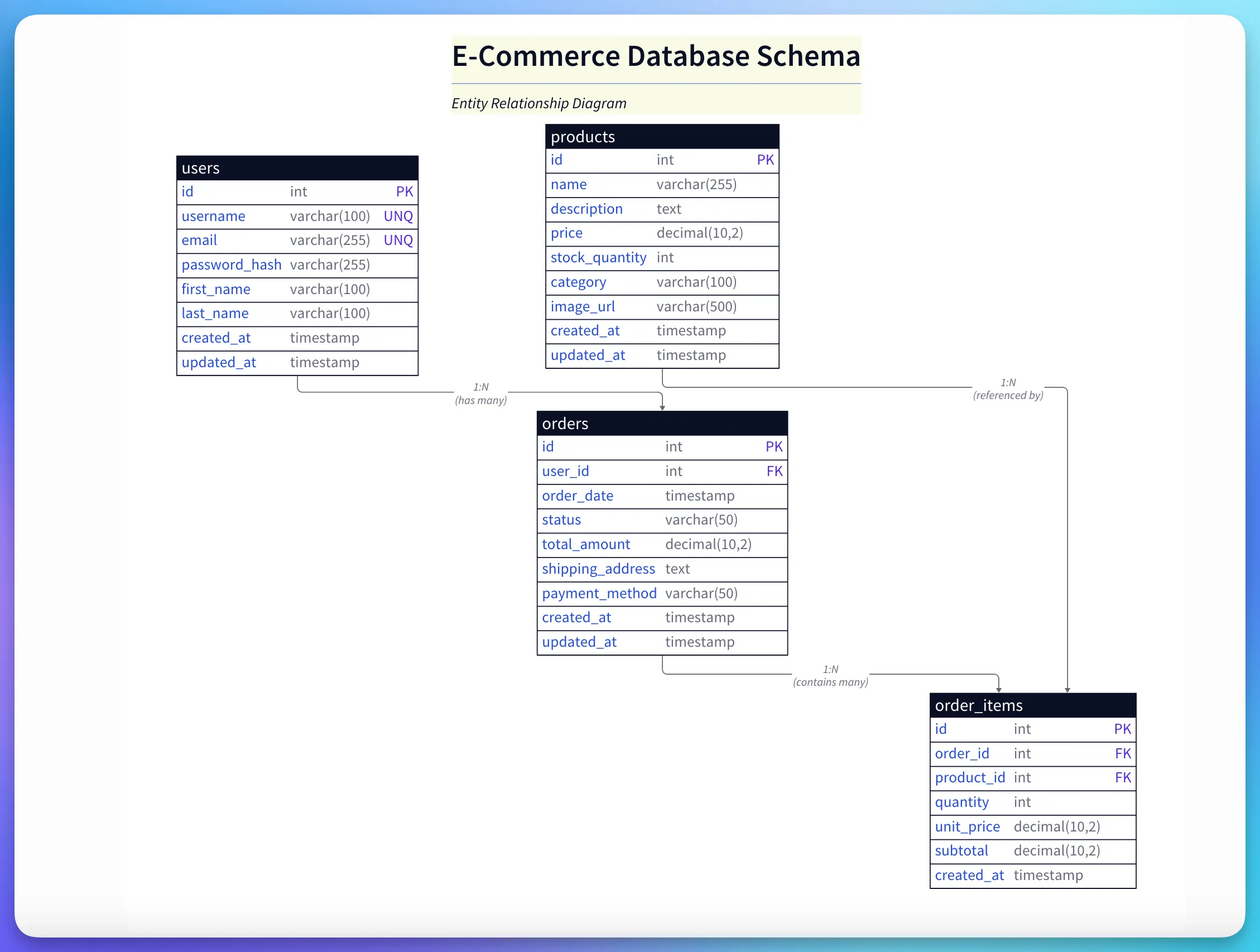
Diagram explanation:
- Auto-generated ER: Tables and relationships are created from a single natural-language prompt, with cardinality and foreign-key relationships inferred automatically.
- Why it helps: Saves the manual effort of laying out entities and linking relationships, letting you focus on domain design instead of tooling.
This isn’t magic. It’s just a different philosophy of tool design. The tool’s job isn’t to expose every possible knob and lever. Its job is to understand what you’re trying to do.
Intent-Based Interaction
When you interact conversationally, you’re working at the level of intent, not implementation. You describe the outcome, and the tool figures out the steps.
This really shines for complex, multi-step operations. Traditional tools would have you selecting templates, adding components, drawing connections, and adjusting layouts. With a conversational approach, you just describe what you want and the tool handles the rest.
Why Conversational Tools Win: The Productivity Multiplier
This shift creates real, measurable productivity gains. Conversational interfaces don’t just make tools “easier to use.” They make workflows that were previously too tedious to bother with suddenly practical.
You get three compounding benefits:
- Speed: What used to take hours now takes minutes
- Accessibility: Junior and senior developers can be productive immediately, no expertise barrier
- Versatility: One interface works across all diagram types, so you’re not constantly relearning tools
What Makes a Good Conversational Developer Tool?
Not all conversational interfaces are created equal. There are a few key principles that separate genuinely useful tools from gimmicks.
1. Understand Domain Context
A good conversational tool understands the domain, not just English. When you say “create a REST API diagram,” it should automatically include endpoints, HTTP methods, and authentication flows. It should act like a knowledgeable colleague who already knows the conventions, not a blank slate where you have to spell out every detail.
2. Support Iterative Refinement
Real creative work is iterative. A good conversational tool supports back-and-forth refinement. Follow-up prompts like “make the database icon bigger” or “change auth to OAuth” should update what’s already there, not force you to start from scratch. This turns the tool into a thought partner instead of a one-shot command executor.
3. Provide Escape Hatches
Conversational interfaces aren’t omniscient. When you need fine-grained control, tools that generate diagrams as code (like D2 or Mermaid) let you drop down and edit the source directly. This hybrid approach delivers the speed of conversation with the precision of code when you need it.
4. Integrate with Existing Workflows
Developer tools don’t exist in a vacuum. They’re part of a larger ecosystem of version control, documentation systems, CI/CD pipelines, and communication platforms. A good conversational tool integrates seamlessly. It can generate diagrams from GitHub repositories, export to wikis, and embed in IDEs. Integration isn’t optional. It’s essential.
The Shift from “Learning” to “Using”
The promise of conversational interfaces is simple: collapse the barrier between intent and outcome.
Traditional tools make you translate your ideas into the tool’s language. You learn its syntax, memorize its shortcuts, and switch your mode of thinking.
Conversational tools eliminate this friction. You express intent in the language you already think in, and the tool handles the rest. The result? You spend less time operating tools and more time solving problems.
AI Diagram Maker: A Case Study in Conversational Design
These principles aren’t just theoretical. Tools like AI Diagram Maker are putting them into practice today.
Natural Language to Diagram
The core experience is conversational. You describe a system, and you get a diagram. No shape libraries. No manual layout. Just description to visualization.
Prompt
Create a microservices architecture diagram showing an API gateway, three backend services (user, product, and order), a shared PostgreSQL database, a Redis cache, and a message queue for async processing.
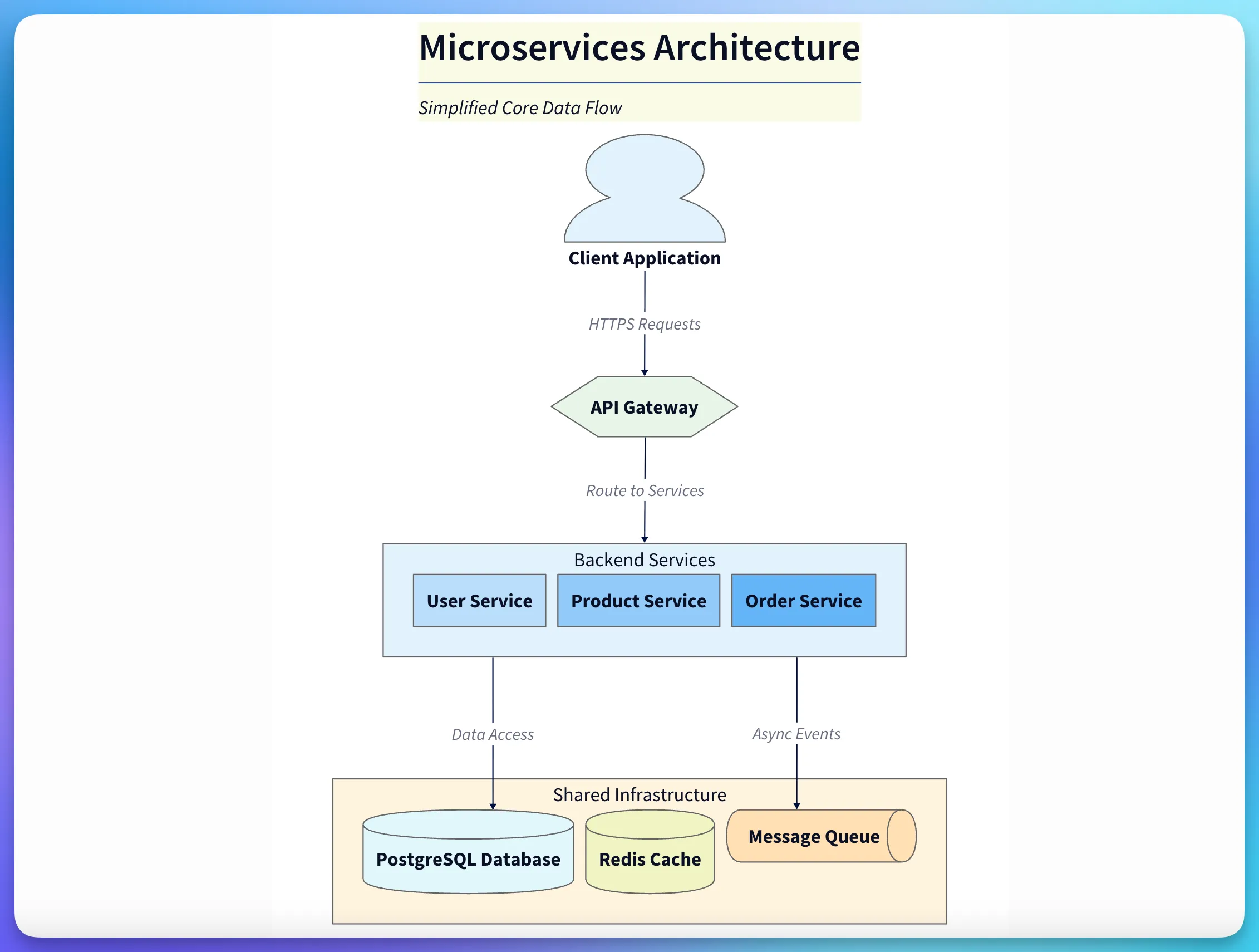
Diagram explanation:
- Service grouping: Shows an API gateway at the edge with three backend services, a shared PostgreSQL database, a Redis cache, and a message queue for async processing.
- Design takeaway: The layout emphasizes entry points, compute vs data components, and common architectural patterns so stakeholders can grasp the topology quickly.
The diagram that comes out is clean, properly labeled, and follows conventions. The gateway is at the entry point. The services are grouped together. The data stores look visually distinct from the compute components. This isn’t random. It’s trained on thousands of real-world architecture patterns.
Code to Diagram
Even more powerful is going directly from code to diagram. You point the tool at a GitHub repository and ask:
Prompt
Analyze the
/services/order-processingdirectory in this repository and create a component diagram showing the major modules and their dependencies.
The tool scans the code, identifies the import statements, infers the dependency graph, and generates a visual representation. This is living documentation. The diagram is generated from the current state of the code, so it’s always accurate.
This solves the biggest pain point in technical documentation: keeping it up to date. The diagram isn’t a separate artifact that drifts out of sync. It’s derived from the source of truth.
Iterative Refinement
Once a diagram exists, refining it is conversational:
Follow-up
Highlight the order service in red and add an annotation showing it handles 10,000 requests per minute.
The diagram updates immediately. You’re not hunting through property panels or style menus. You’re describing the change, and it happens.
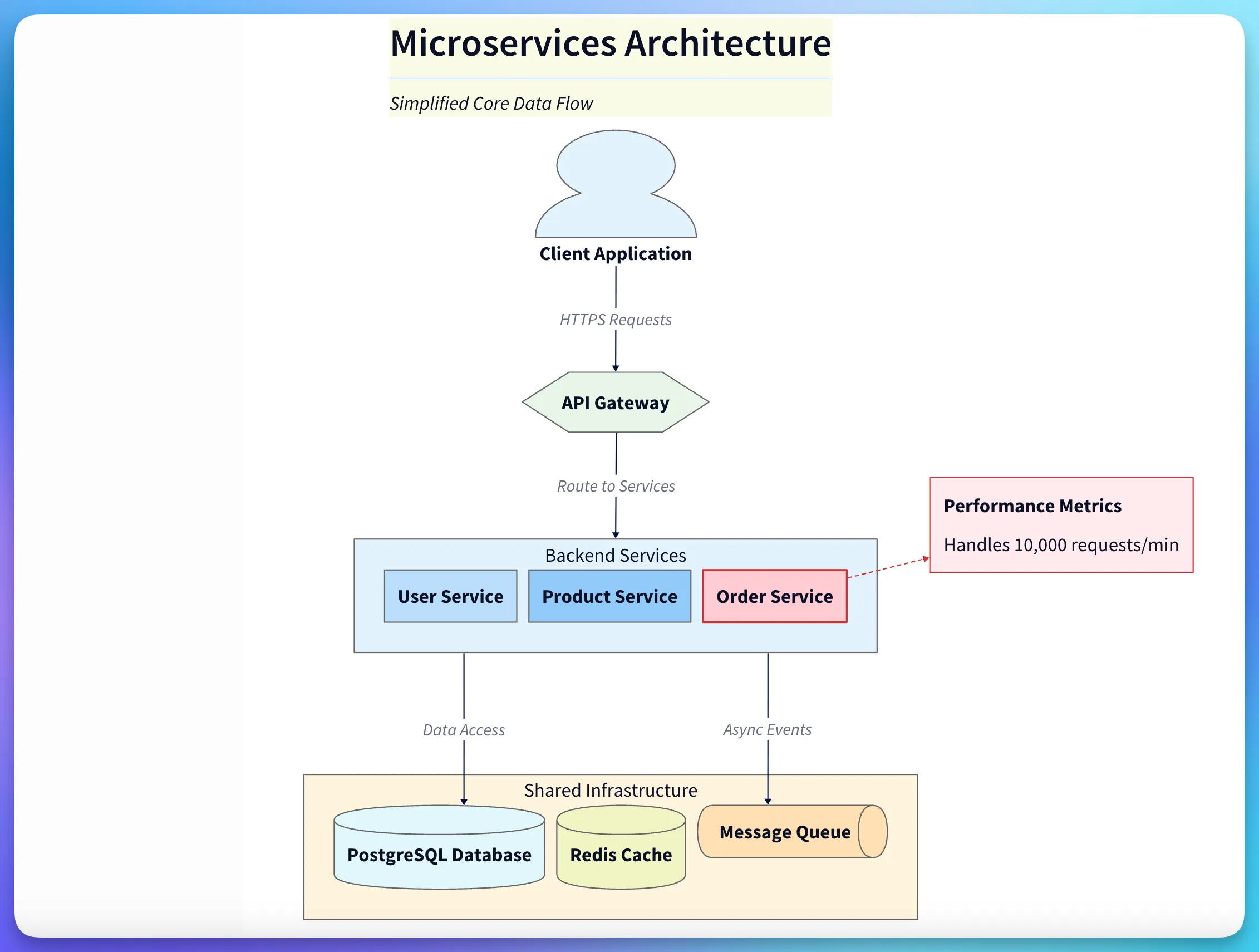
Diagram explanation:
- Interactive refinement: Demonstrates how follow-up prompts (highlighting, annotations, styling) update an existing diagram without rebuilding from scratch.
- Practical value: Enables rapid iteration during design reviews or PR discussions—small changes are conversational, not manual.
This makes the tool useful not just for initial creation, but for ongoing work. As your architecture evolves, your diagrams evolve with it, with minimal effort.
Output as Code
Under the hood, diagrams are generated as D2 code, a modern, declarative diagramming language. This means you can version control your diagrams. You can diff them. You can review changes in a pull request.
For developers, this changes everything. Diagrams stop being binary blobs in a design-assets folder. They become first-class artifacts in your codebase.
If you need fine control, you can edit the D2 directly. It’s readable and intuitive. But most of the time, you won’t need to. The conversational interface handles 90% of what you’ll want to do.
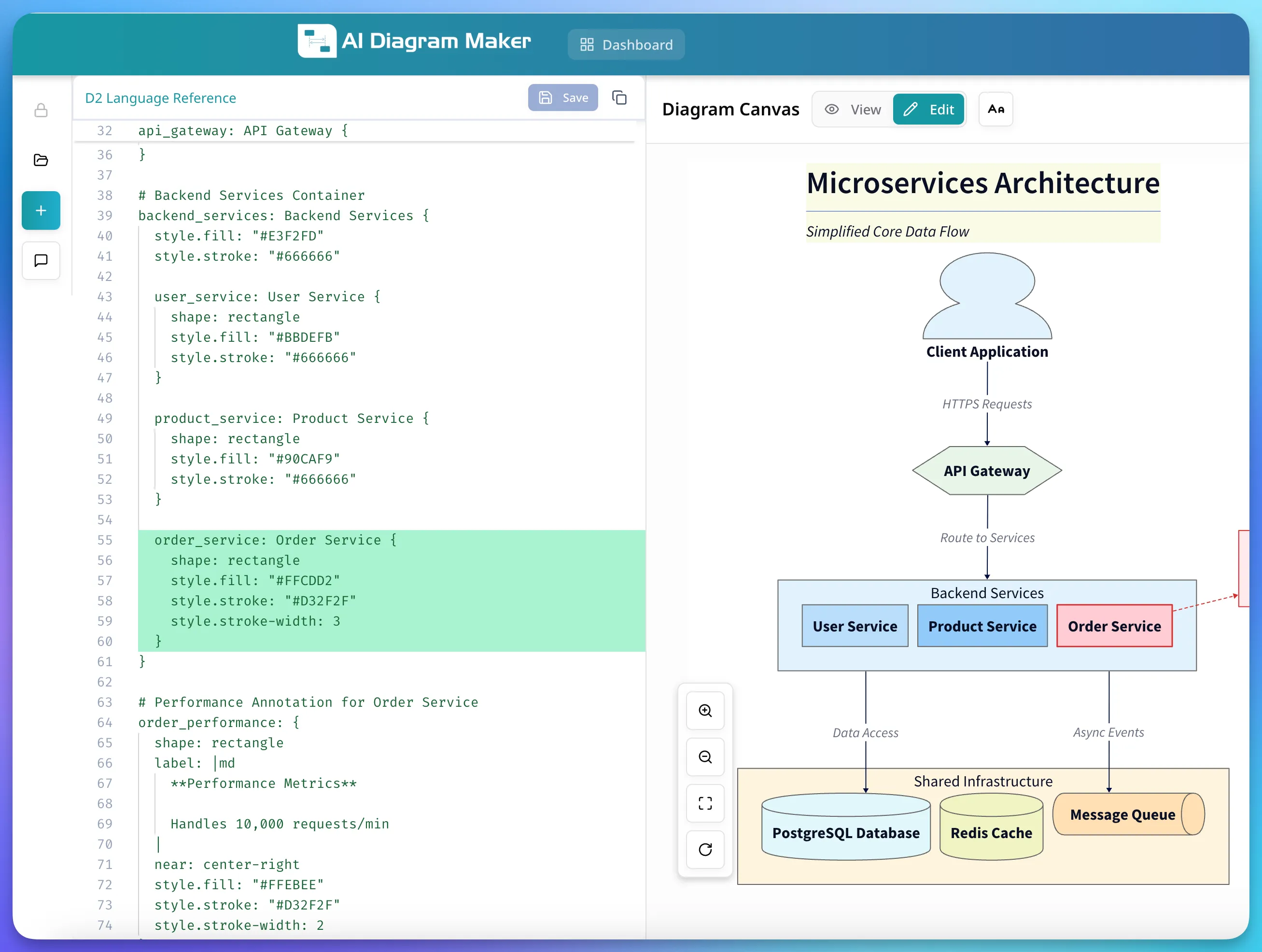
Diagram explanation:
- Code-as-diagram: Shows editable D2 source alongside the rendered diagram, enabling precise control and versioning of visuals.
- Best of both worlds: Use conversation for speed and D2 for deterministic, reviewable edits when exact output is required.
The Future Is Conversational
We’re at the beginning of a major shift in how developers interact with tools. The pattern you’re seeing with diagramming is happening across the industry. Code editors with conversational AI assistants. Natural language test generation. Intent-based CI/CD configurations.
The common thread? Tools that adapt to the developer, not the other way around.
This doesn’t mean all UIs will disappear. Graphical interfaces are still valuable for many tasks. But for creation, translation, and automation workflows, conversational interfaces are becoming the better choice. As AI models improve, they’ll only get better at understanding complex and nuanced requests.
Conclusion: The Tools That Understand You
The best tool is the one you don’t have to think about. It gets out of your way and lets you focus on solving problems, not learning interfaces.
For too long, developer tools have demanded too much. Learn my syntax. Memorize my shortcuts. Adapt to my mental model. That era is ending. The tools that win will be the ones that adapt to you, speak your language, and let you describe what you want.
Conversational interfaces represent a fundamental rethinking of how software should work. They turn usage into a dialogue instead of a procedure. For developers tired of fighting with their tools or abandoning diagrams halfway through, this changes everything.
Try it yourself: Generate your first diagram with natural language at AIDiagramMaker.com and experience the difference between learning a tool and just using one.