· Scenarios · 2 min read
Scenario: Mapping a React App for a New Frontend Hire
A practical scenario guide on creating a visual map of a complex React component tree to effectively onboard a new frontend developer.
You are the Frontend Lead. You just hired a new React developer.
Your app is massive. It has 200 components. It uses Redux, React Query, and three different UI libraries.
The new hire pulls the repo. They open App.tsx. They see a wall of Context Providers.
<AuthProvider>
  <ThemeProvider>
    <QueryProvider>
      <Layout>
        <Router>
They look lost. “So… where does the user dashboard actually live?”
They can’t see the tree for the forest.
The Challenge: Complex component tree
Frontend architecture is hierarchical. To understand the app you need to understand the Parent-Child relationships.
If you explain it verbally “Oh the Dashboard is a child of the Layout which is a child of the Router” they will forget it in five minutes.
You need a visual map of the component tree.
The Workflow:
Here is how you generate that map in seconds.
Copying component files
You open your routes.tsx or your main component file. You copy the JSX.
Generating the tree hierarchy
You paste it into AI Diagram Maker.
“Visualize this React component hierarchy.”
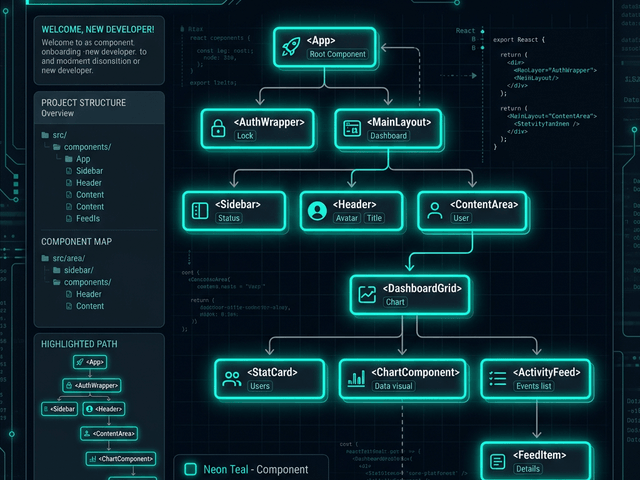
The AI draws a tree diagram.
- App is at the top. It branches into AuthLayout and PublicLayout.
- AuthLayout branches into Sidebar, Header, and Dashboard.
- Dashboard branches into StatsWidget and RecentOrders.
You export this diagram. You commit it to the repo as docs/architecture/component-tree.svg.
The Result: Visualizing prop flow
You show the diagram to the new hire.
“See this branch? This is the authenticated side. Everything under here has access to the User object.” “See this branch? This is public. No user data here.”
The lightbulb goes on. They understand the data flow. They know exactly where to add their new feature.
Map your frontend. Stop letting your component tree remain a mystery. Use AI Diagram Maker to visualize your React hierarchy. It turns spaghetti code into a structured map.