· Scenario · 8 min read
Scenario: Mapping a User Registration Logic with AI (Flowchart)
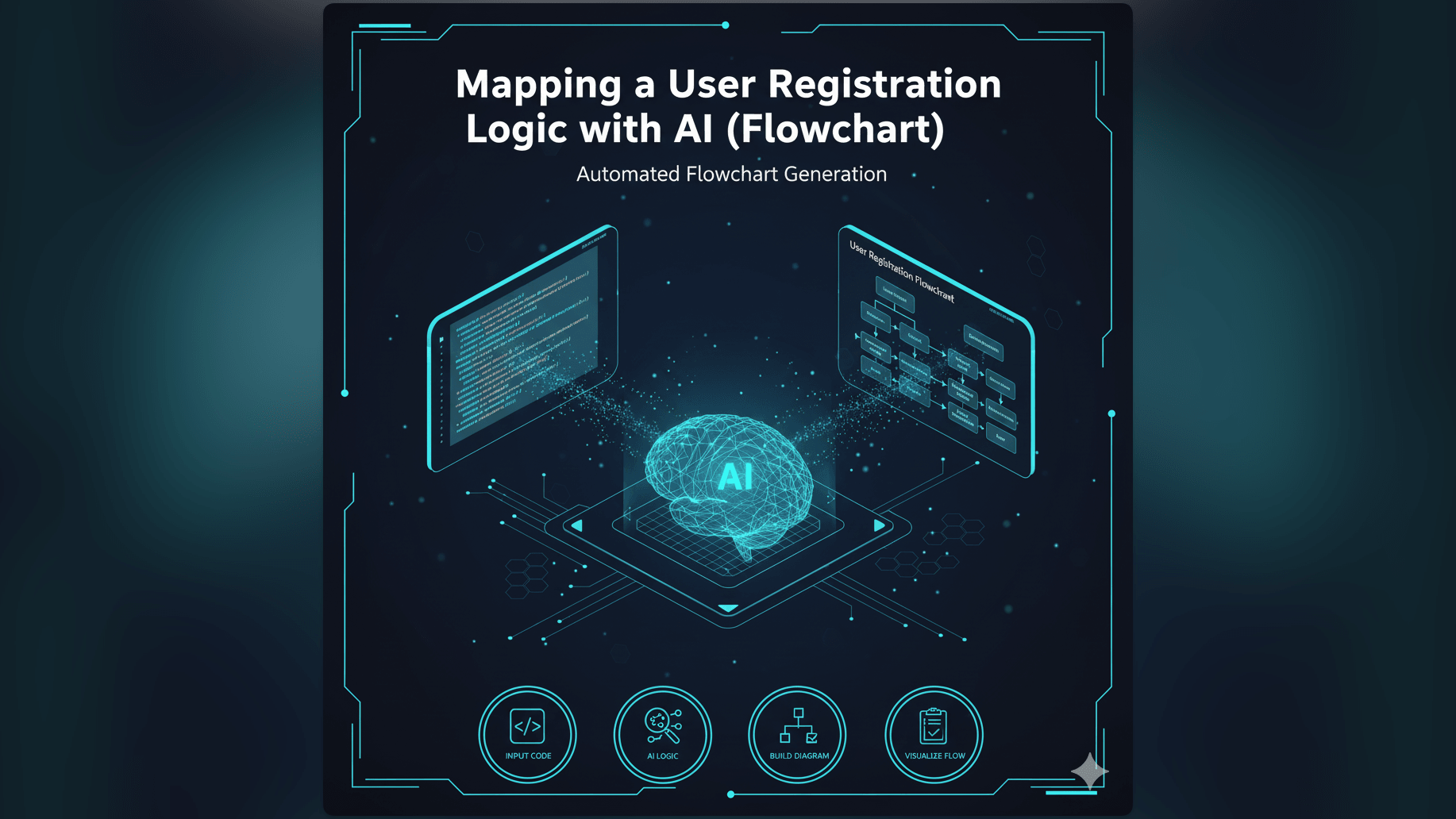
Mapping complex user registration logic with multiple edge cases is a challenge for any developer. Learn how to use an AI flowchart maker to turn simple descriptions into robust logic maps instantly.
It starts with a simple request.
The Product Manager leans over your desk or pings you on Slack. They say: “Hey we need to update the signup flow. We want to add Google Login and maybe a phone number verification step.”
You nod. It sounds simple enough. It is just a few input fields and a couple of API calls. How hard can it be?
But as you sit down to map it out, the complexity explodes.
What happens if the Google email already exists in the database? Do we merge the accounts? What if the SMS fails to send? Do we have a retry limit? What if the user clicks “Back” during the OTP verification?
Suddenly that simple request has turned into a sprawling logic tree with twelve different edge cases. You need a map. You need a flowchart.
The Real-Life Challenge: Defining a Flawless User Onboarding Flow
User registration is the front door of your application. If the lock sticks, people just walk away.
The Importance of Clear User Registration Logic for UX and Development
A smooth onboarding experience is critical for conversion. But for the developers building it, clarity is even more important.
If the logic isn’t clearly defined, you end up with “zombie users” in your database: accounts that are half created but missing a password. You end up with security holes where a user can bypass verification.
The Pain Point: Manual Mapping Leads to Errors, Oversights, and Delays
The problem is that mapping this logic is hard work.
When you try to hold the entire state machine in your head, you miss things. You forget to define the “Error” path. You assume the happy path is the only path.
Why Developers and Product Managers Struggle with Manual Flowcharting
And when you try to put it on paper (or a screen), the tools fight you. You are trying to solve a logic puzzle but your tool is making you solve a geometry puzzle. You are worrying about aligning boxes when you should be worrying about race conditions.
The Old Way: Manual Flowchart Creation is Slow and Prone to Errors
Let’s look at how this usually goes down with traditional tools.
Drawing Each Step: Decision Points, Input Fields, Database Interactions
You open your diagramming software. You drag a “Start” oval. You drag a box for “Enter Email.” You drag a diamond for “Is Email Valid?” You spend five minutes just drawing the lines. Then you realize you forgot to add a “Check Password Strength” step.
The Headache of Revisions: Shifting Boxes and Re-routing Arrows
This is the moment the soul leaves your body.
To insert that one new step, you have to select everything below it. You have to drag it down. The arrows disconnect. The alignment grids snap to the wrong place. You spend ten minutes fixing the diagram just to get back to where you started.
Inconsistent Documentation Across Teams
Because it is so painful, you stop updating the diagram. The Product Manager has one version in a PDF. The Design team has another version in Figma. The Developers are looking at the code which tells a third story.
This inconsistency is why bugs happen.
Introducing AI Diagram Maker: Your AI Flowchart Maker for Logic Refinement
We built AI Diagram Maker to handle this specific mess. We wanted to separate the logic from the layout.
Describe Your Logic, Get an Instant Flowchart
With our tool, you don’t act like a drafter. You act like a narrator.
You simply tell the AI what should happen. You describe the flow in plain English just like you would explain it to a colleague at the coffee machine. The AI handles the drawing.
The Power of Chat-based Refinement: Iterate on Your Flow in Real-Time
But the real magic isn’t the first draft. It is the edit.
Software design is an iterative process. You never get it 100% right on the first try. With our chat interface, you can refine the logic conversationally.
“Oh I forgot the error state.” You just type that. The AI fixes the diagram. It is like pair programming with a tireless artist.
Focus on the “What,” Not the “How to Draw It”
This shift allows you to stay in the “problem solving” mindset. You are focused on the Process Flow Diagram (PFD) as a logical structure, not as a drawing project.
AI Diagram Maker Workflow: Mapping User Registration Logic, Step-by-Step
Let’s walk through exactly how you would tackle that “Google Login” request using our tool.
Step 1: Initial Prompt
You start with the broad strokes. You open the prompt box and type:
“Create a user registration flowchart. The user enters an email and password. We validate the format. If it is invalid show an error. If valid create the user in the DB and send a welcome email.”
You hit enter. In seconds you have a clean linear flowchart. It is basic but it is a solid foundation.
Step 2: AI Generates the Basic Flowchart
The AI has drawn the decision diamonds. It has labeled the “Yes” and “No” paths. It has verified that the logic terminates at an “End” node. You didn’t have to drag a single box.
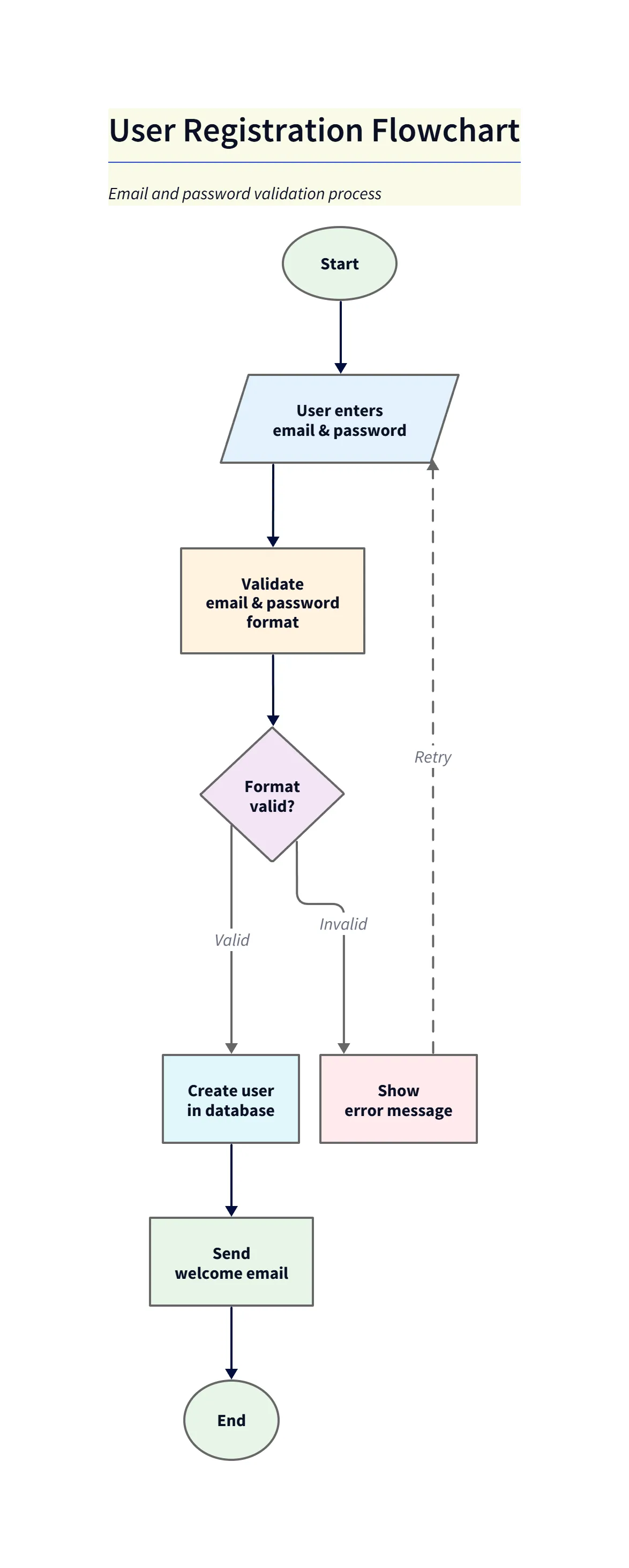
Diagram explanation:
- Start & Input: The flow begins at
Startwhere the user chooses a registration method or enters email and password. - Format Validation: A validation node checks email/password format before proceeding.
- Decision Paths: Valid and invalid branches are clearly labeled; invalid paths show error and retry points, while valid paths continue to account creation and welcome email.
- Exportable Asset: This basic output is suitable for quick sharing with product or engineering as an initial blueprint.
Step 3: Refining with Chat
Now comes the complex part. You need to add the Google Login and the edge cases. Instead of dragging boxes, you type into the chat:
“Add an option at the start for ‘Sign up with Google’. If they choose this check if the email exists. If it exists merge the account. If not create a new one.”
The diagram updates instantly. The AI branches the start node. It adds the logic for the Google flow. Then you realize another issue:
“Also add a check for password complexity. If the password is too weak show a specific error message.”
The AI inserts this step into the password flow. It moves all the downstream nodes automatically to make space.
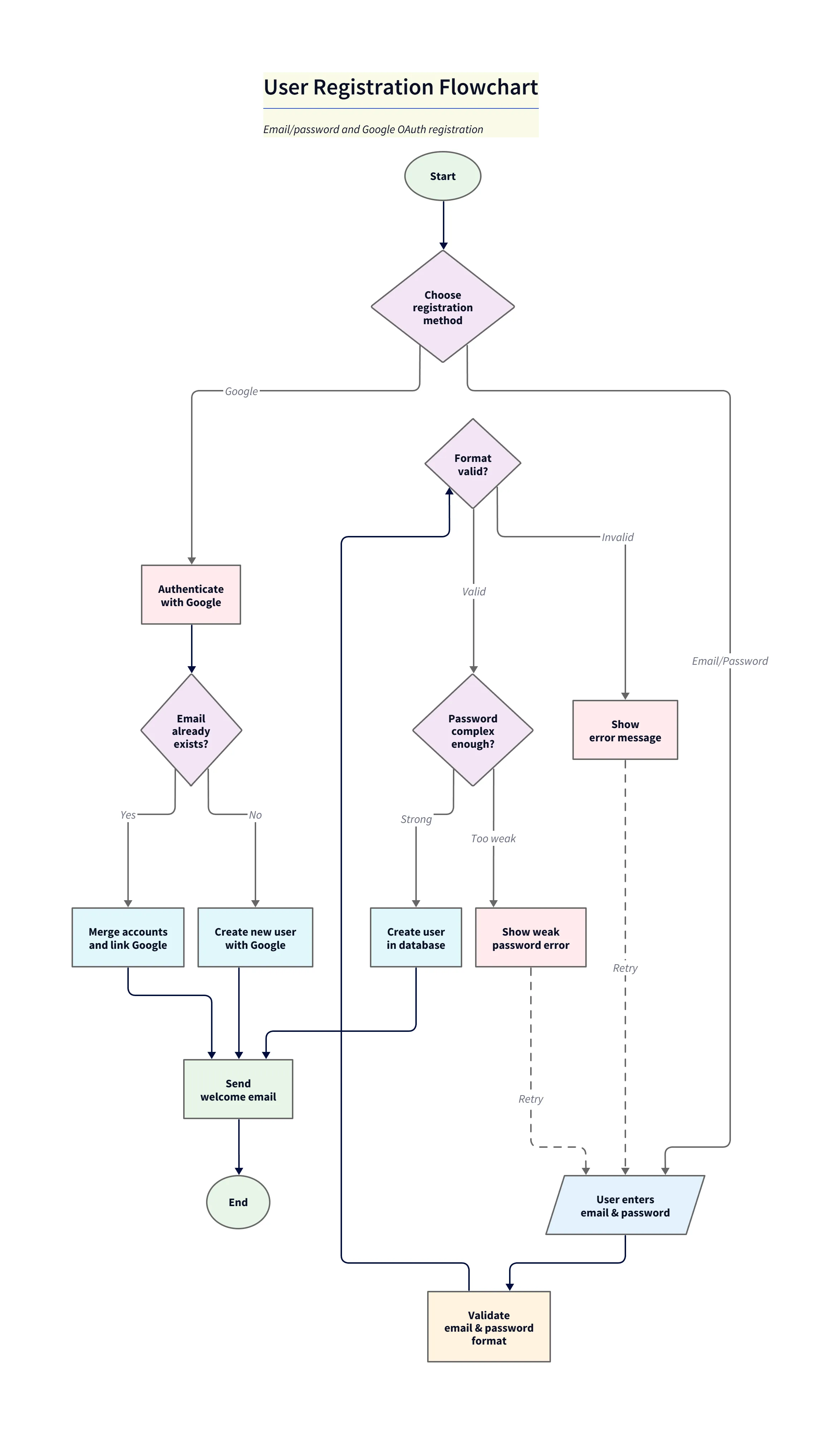
Diagram explanation:
- Third-party auth branch: The refined diagram shows a dedicated Google OAuth branch that authenticates the user and checks whether the Google email already exists.
- Account Merge vs Create: When the email exists, the flow illustrates merging/linking accounts; otherwise it creates a new user tied to Google.
- Password complexity & retries: The email/password path includes a password-strength decision, explicit weak-password messaging, and retry loops back to input.
- Single source of truth: The refined chart consolidates all paths (Google and Email/Password) into the final account-creation and welcome-email steps for clear handoff to engineering.
Step 4: Finalizing and Exporting for Team Review and Development
You look at the flow. It covers the happy path. It covers the errors. It covers the third-party login. It took you three minutes.
You export it as an SVG. You paste it into the Jira ticket or the PR description. Now everyone knows exactly what needs to be built.
The Output: A Clear, Comprehensive, and Actionable User Registration Flowchart
The result is more than just a pretty picture.
Visual Clarity for Development, QA, and Product Teams
For the developer picking up the ticket, the path is clear. They can see exactly where the if statements need to go. For the QA tester, they have a map for their test cases. “Okay I need to test the path where the Google email exists but the account is disabled.”
Consistent Documentation for Future Reference
Because it was so easy to create, you are more likely to keep it updated. When the requirements change next month, you won’t dread opening the file. You will just open the chat and say “Remove the Google Login step.”
A Single Source of Truth for Your Onboarding Logic
You have established a single source of truth. The diagram matches the intent which matches the code.
Who Benefits Most from AI-Driven Logic Mapping?
This workflow is a lifesaver for anyone who sits between the business requirements and the code.
- Product Managers Defining User Journeys: You can validate your requirements before you hand them off. You can see the complexity of your requests visually.
- Software Engineers Implementing Registration Systems: You get a blueprint. You don’t have to guess what the PM meant by “handle errors gracefully.”
- QA Testers Validating Workflow Functionality: You can ensure you have 100% test coverage because you can see every branch of the logic tree.
- Technical Writers Documenting User Guides: You have professional assets ready to drop into help center articles.
Ready to Streamline Your Logic? Experience the AI Flowchart Maker
Don’t let complex logic slow you down. Stop fighting with alignment grids and start designing better systems.
Start mapping your complex processes with AI Diagram Maker today. Use our AI Flowchart Maker to describe your flow and let us handle the rest. You can also find more information in The Developer’s Guide to AI Diagramming.